 RoutineVault
Standard pack
Fast Charging toggle
One tap from a Home screen widget lifts the Battery protection charge cap and switches Fast charging on. Tap it again and both go back to their protective defaults. Leave your phone capped and cool day to day, then get a genuinely quick top-up when you're about to walk out the door.
- Trigger: manual
- Fast charging on
- Charge cap lifted
- Both restored on exit
- Home screen widget
Scan with Routines+
Included in the Standard pack. The ready-made QR code imports this routine in about ten seconds, with the end-of-routine restore already wired up — the part that's easy to forget when building it by hand.
Get Standard — €3.99Or build it yourself for free — see the Build it tab.
Import the file
Included in the Standard pack. You get
fast-charging.rtn plus the NFC killswitch, both ready to
import, with free fixes when a One UI update changes something.
Or build it yourself for free — see the Build it tab.
Build it yourself
Free, about three minutes. Settings › Modes and Routines › Routines tab › +.
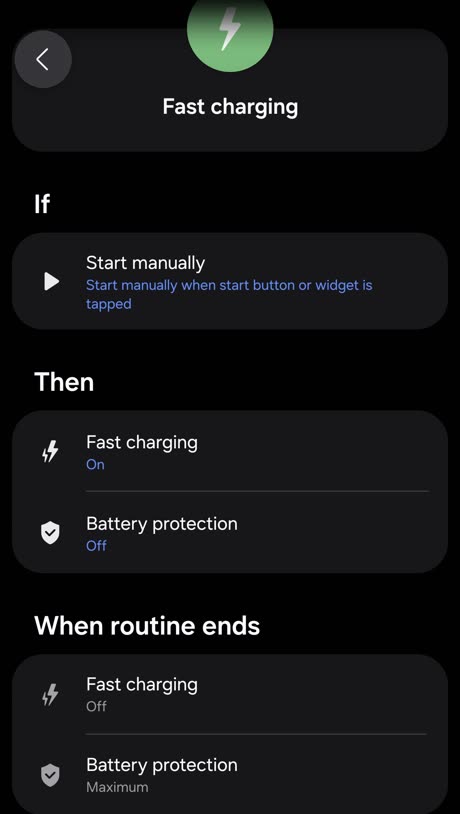
- If › Manual › Start manually. Runs when the start button or widget is tapped — no automatic trigger.
- Then › Battery › Fast charging › On.
- Then › Battery › Battery protection › Off. This is the step people miss. If the charge cap is left on, the battery stops at its limit and fast charging has almost nothing to do.
- When routine ends › Fast charging › Off and Battery protection › Maximum. Scroll to the When routine ends section. This is what puts the phone back to its protective default instead of leaving the cap off permanently.
- Duration › Until I stop it manually.
- Name it Fast Charging, choose an icon, tap Save.
- Put it on your Home screen. Long-press an empty spot › Widgets › Modes and Routines › drag the routine widget out.